See an example comparison
A 1.25L Coke bottle vs a 6-pack of 325ml cans — DealCheck calculates the price per ml instantly and shows which is cheaper, by exactly how much.
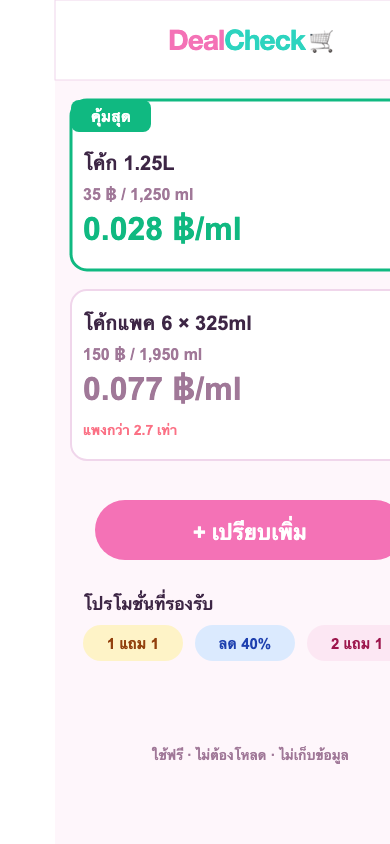
🏆 Best Deal · auto-ranked · supports all promo types
What can it do?
Unit price comparison
Calculates price per ml, g, or piece — easily compare different sizes
Promo-aware
Buy 1 Get 1, Buy 2 Get 1, % off, or custom — calculates the real price automatically
Pack mode
6-pack of Coke × 325ml? Enter it as-is, no manual math needed
Compare up to 5
Compare up to 5 items at once, ranked from best deal to worst
History saved
Remembers your last 10 comparisons — no need to re-enter
Share with friends
Share comparison results via your favorite chat apps or copy as text
How to use
Enter the price and quantity of each item
Supports ml, L, g, kg, or pieces — pick what fits
Pick a promotion (if any)
% off, BOGO, Buy 2 Get 1, or custom — the app adjusts the real price
Tap Compare!
Get instant results showing which is the best deal and by how many percent
Frequently Asked Questions
Which is better: Buy 1 Get 1 or 40% off?
Buy 1 Get 1 equals a 50% discount, so for the same product BOGO always wins. But for different brands or sizes, use DealCheck to compare unit prices.
How do I compare items of different sizes, like 250ml vs 1 liter?
Enter the price and quantity separately, pick the right unit (ml or L), and DealCheck converts and calculates price per ml so you can compare instantly.
What about multi-packs like a 6-can pack — do I need to do math first?
No. Switch on pack mode, enter 6 × 325ml, and the app calculates the total volume for you, then compares it to other items.
Does it work on iPhone and Android?
Yes — works in any browser (Safari, Chrome, etc.). No app download required. You can also "Add to Home Screen" to use it like a native app.